
A .env file is a plain text file that holds an app's settings and secrets, one NAME=value per line, outside the code. The app reads each line as an environment variable: a named value that the operating system hands to a program when it starts. On FPS.ms you do not need the file. You add the variables on your server's Environment tab, and the server gives them to your app every time it starts.
What is an environment variable?
An environment variable is a name with a value, like BOT_TOKEN=MTE4.... Your code asks for the value by its name while it runs. Use them for:
- Secrets: bot tokens, API keys and database passwords. They stay out of your code, so they never end up on GitHub or in a screenshot.
- Settings: a log level, a channel ID or a feature switch. You change them without touching your code.
- One codebase, many places: your laptop and your server can run the same code with different values.
What a .env file looks like
# Settings for cobalt-bot
BOT_TOKEN=MTE4NzQ2Mjk1.example.not-a-real-token
GUILD_ID=1187462950000000000
LOG_LEVEL=info
GREETING="Hello from Cobalt Works"
The format rules:
- One
NAME=valueper line, with no spaces around the=. - Names use capital letters, numbers and underscores, like
API_KEY. - A line that starts with
#is a comment. - Put quotes around a value that contains spaces.
Never push .env to GitHub
Add .env to your .gitignore file before your first commit. Bots scan public repositories for tokens and use a leaked Discord token within minutes. If it happened anyway, reset the token right away.
What is .env.example?
.env.example is a copy of .env with the names but without the secret values. You commit it to your repository, so anyone who runs your app (and FPS.ms, see below) can see which variables it needs:
BOT_TOKEN=
GUILD_ID=
LOG_LEVEL=info
Add environment variables on FPS.ms
- Go to panel.fps.ms and click Manage on your server.
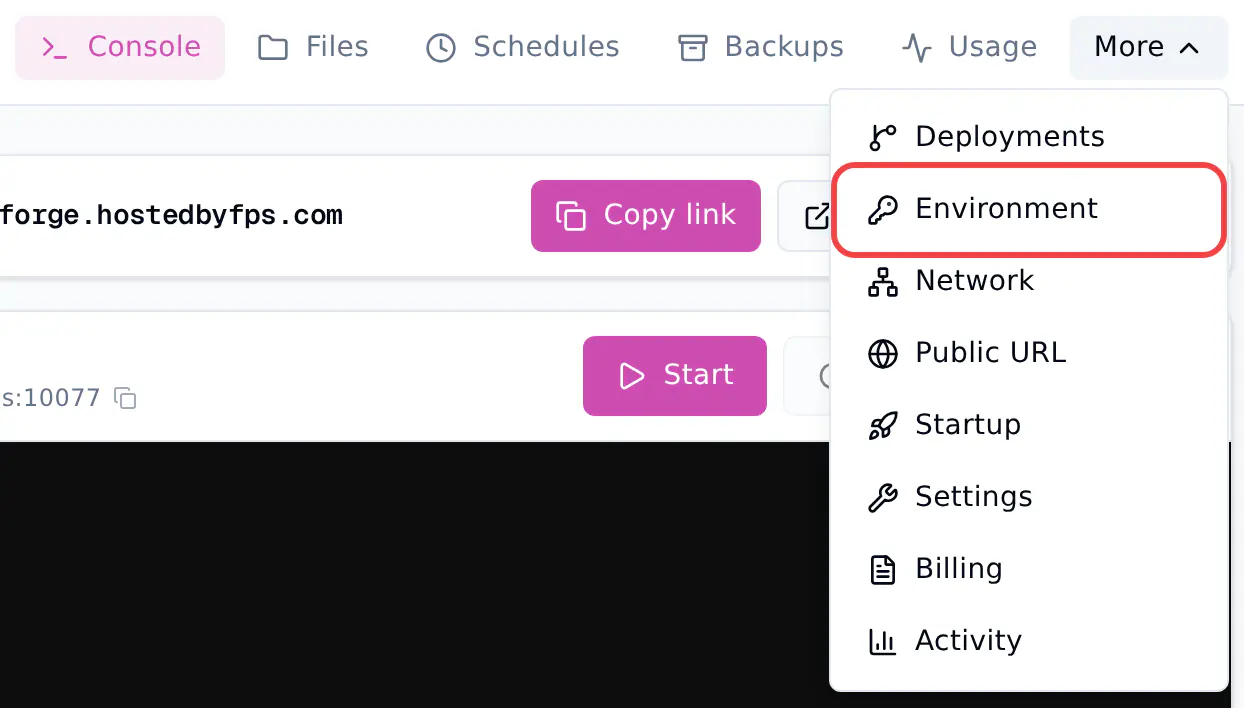
- Click Environment. If you do not see it in the top bar, click More first.
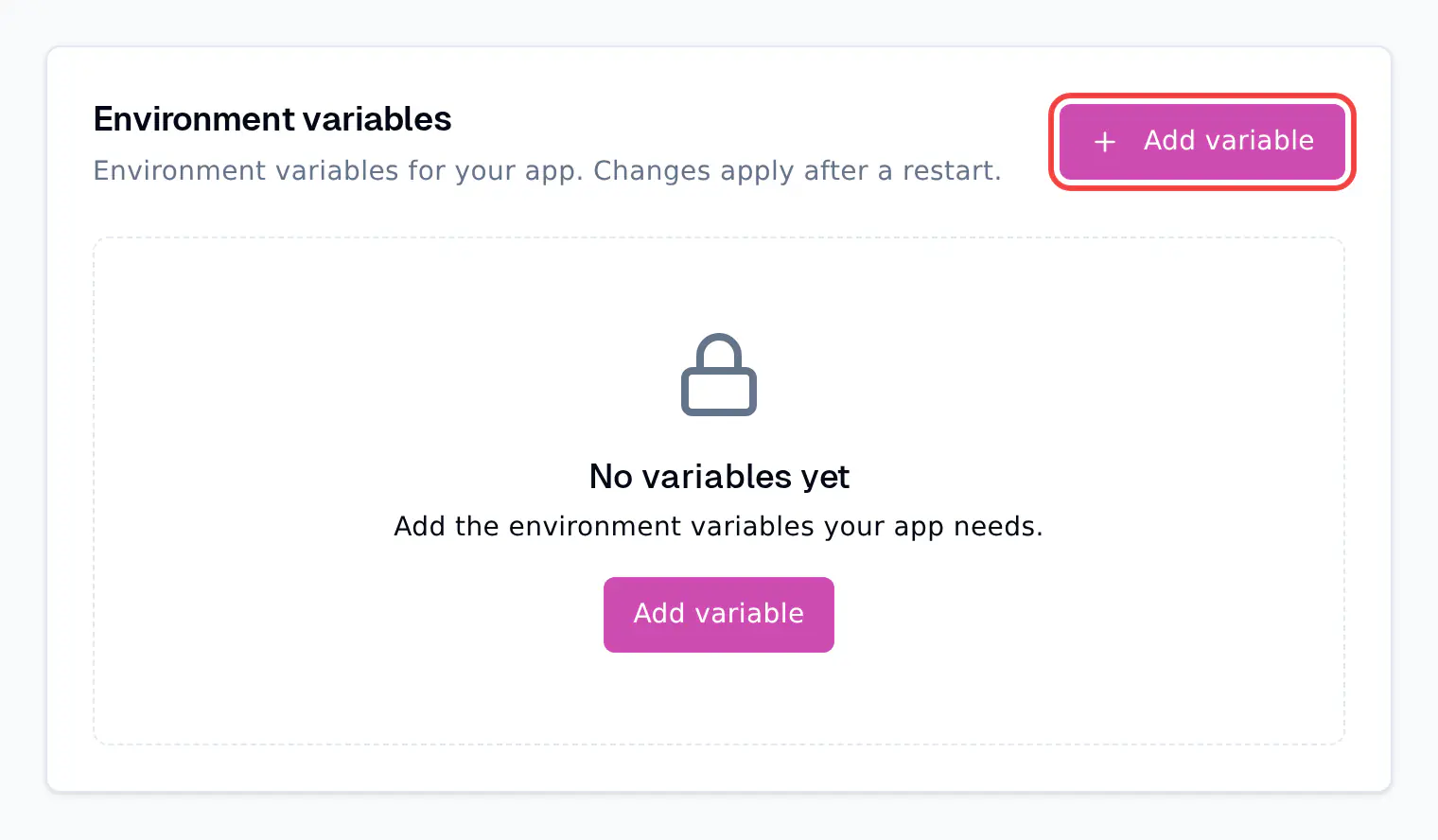
- Click Add variable.
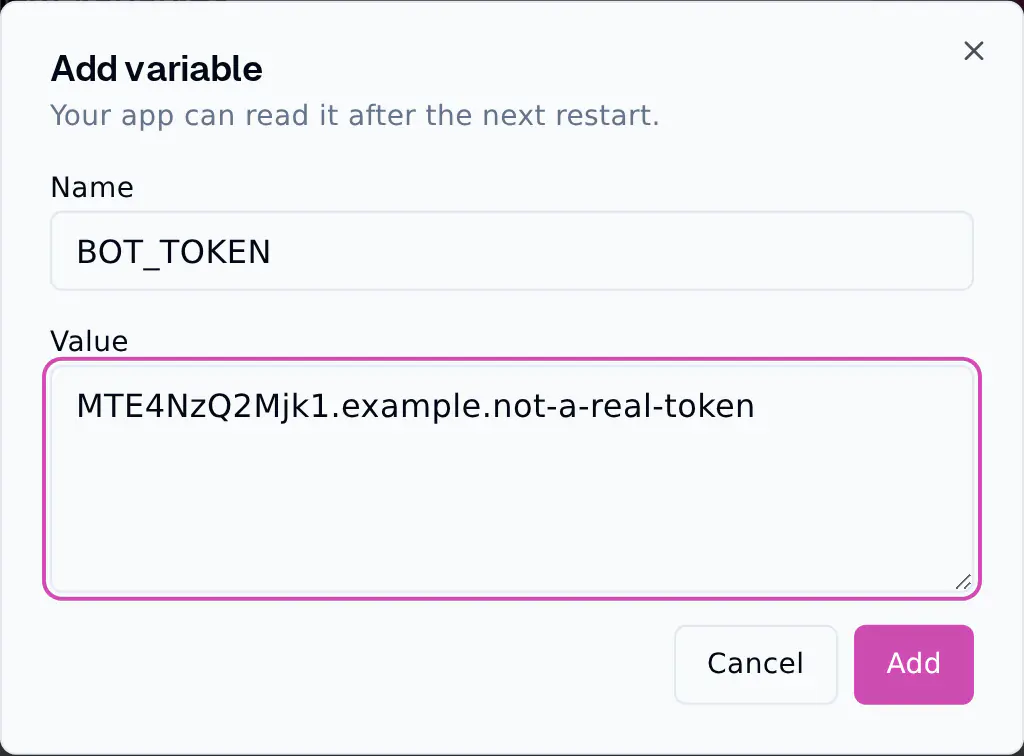
- Type the Name, for example
BOT_TOKEN, and paste the Value. Click Add.
- The variable appears in the list. Its value shows as
***: once saved, a value is never shown again, not even to you.
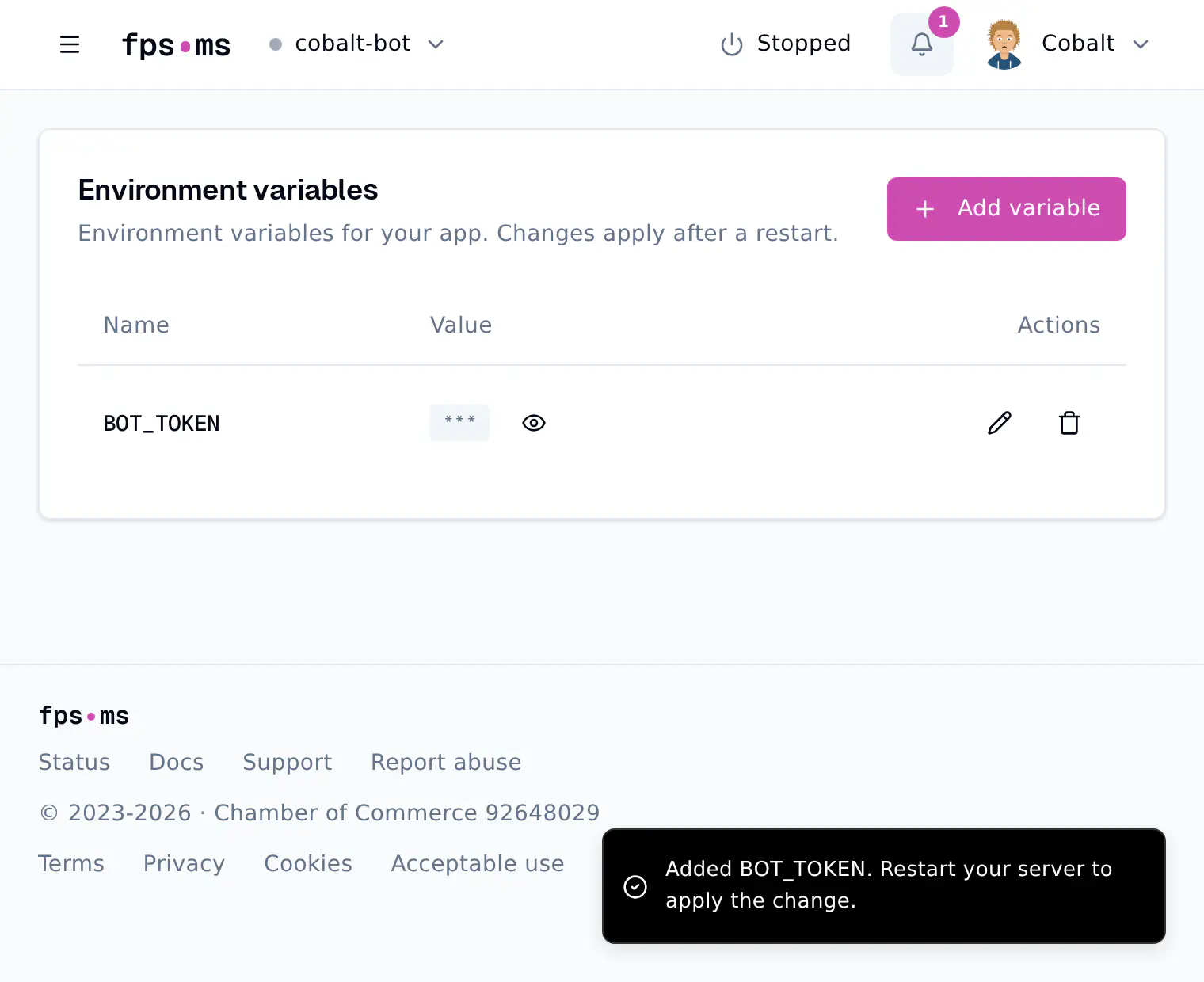
- Click Console and restart your server. Changes apply after a restart.
To change a value, click the pencil icon and type the new value. To remove a variable, click the bin icon. Restart after both.
Fill them in from .env.example
When your server has no variables yet and your app has a .env.example file in its main folder, the Environment tab lists the names from that file for you.
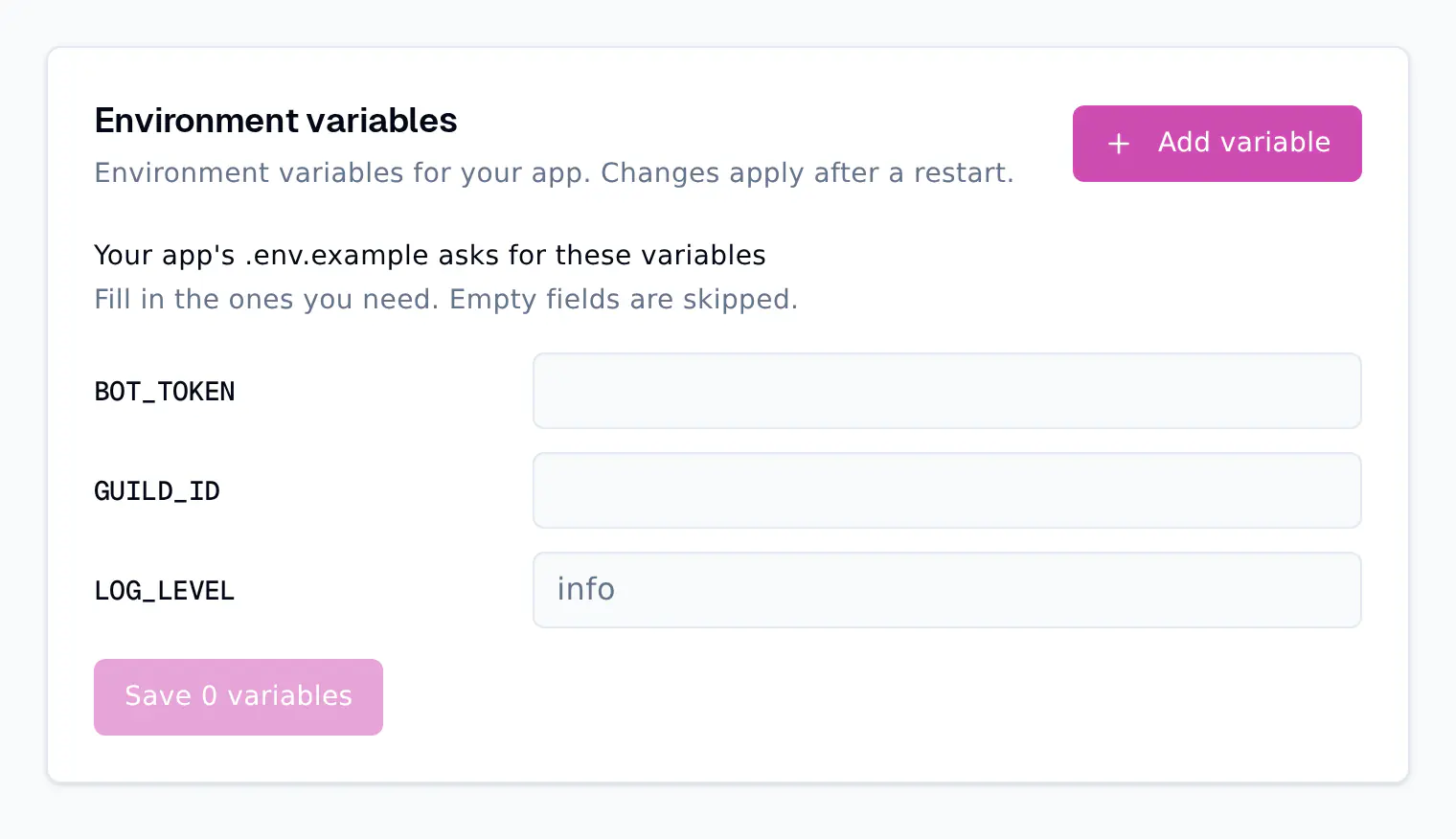
- Type a value next to each name you need. A value from
.env.example, likeinfo, shows in grey as a hint. Type it if you want to keep it. - Empty fields are skipped.
- Click the Save button, which counts the variables you filled in, and restart your server.
This also works for an app you deploy from GitHub: commit .env.example, and the names show up after the first deploy.
Read a variable in your code
You read a variable the same way whether it comes from the Environment tab or from your computer.
Python
import os

# Stops with a KeyError when BOT_TOKEN is missing.
token = os.environ["BOT_TOKEN"]

# Uses "info" when LOG_LEVEL is missing.
log_level = os.getenv("LOG_LEVEL", "info")
You do not need python-dotenv for variables from the Environment tab. If you also use a .env file on your computer, load_dotenv() never overwrites a variable that is already set, so on FPS.ms the value from the Environment tab wins.
Node.js and Bun
const token = process.env.BOT_TOKEN;
const logLevel = process.env.LOG_LEVEL ?? 'info';

if (!token) throw new Error('BOT_TOKEN is not set');
Node.js does not need the dotenv package for these either. Like load_dotenv(), dotenv does not overwrite variables that are already set.
Other runtimes
| Runtime | Read BOT_TOKEN |
|---|---|
| Go | os.Getenv("BOT_TOKEN") |
| Java and Kotlin | System.getenv("BOT_TOKEN") |
| Rust | std::env::var("BOT_TOKEN") |
| .NET (C#) | Environment.GetEnvironmentVariable("BOT_TOKEN") |
| Dart | Platform.environment['BOT_TOKEN'] (from dart:io) |
| Lua | os.getenv("BOT_TOKEN") |
Rules and limits
| Free plan | Paid plan | |
|---|---|---|
| Variables per server | 8 | 100 |
| Size of one value | 32 KB | 32 KB |
| All names and values together | 64 KB | 64 KB |
- Names use capital letters, numbers and underscores, and cannot start with a number. Names are case-sensitive:
BOT_TOKENandBot_Tokenare different. - Reserved names are set by FPS.ms and cannot be added:
PATH,HOME,USER,TZ,SERVER_PORT,SERVER_MEMORY,SERVER_IP,NODE_OPTIONS,NODE_PATH,PYTHONPATH,JAVA_TOOL_OPTIONS, every name that starts withLD_orP_SERVER_, and the names GitHub deploys use (COMMIT_SHA,BRANCH,RELEASE_DIRand a few more). - Startup settings like
REQUIREMENTS_FILEon Python are changed on the Startup tab, not here.
Environment tab or .env file?
Both work. The Environment tab is the safer place for secrets:
| Environment tab | .env file in Files |
|
|---|---|---|
| Value visible after saving | No, never | Yes, to everyone with file access |
| Can end up on GitHub | No | Yes, if you commit it by mistake |
| Extra package in your code | No | python-dotenv or dotenv |
| Available during GitHub deploy builds | Yes | Only if the build reads the file |
| Limit on a free server | 8 variables | None |
When the same name is in both, the value from the Environment tab wins.
Common problems
KeyError: 'BOT_TOKEN'orundefined: check the name for typos and capitals, then restart. Variables only reach your app after a restart.- "This name is reserved by the platform and cannot be set here": pick another name, for example
APP_TZinstead ofTZ. - "This name is already a startup variable": change it on the Startup tab instead.
- "Free servers can have up to 8 environment variables": put the less secret settings in a
.envfile, or upgrade the server. - No Environment tab, or "This server can't use environment variables": your server runs on an older node. Use a
.envfile for now.